YourFi.ai · Happiness planner

Savings, house, pension and tax in one plan

The retirement planner for your whole financial life.

More than a calculator: YourFi puts your savings, investments, home, mortgage and pensions in one plan and walks it year by year to age 100. You see the age you can stop working — and what every year after that looks like.

Try the calculator first

  • The plan to 100 is free
  • No credit card required
  • No bank login needed
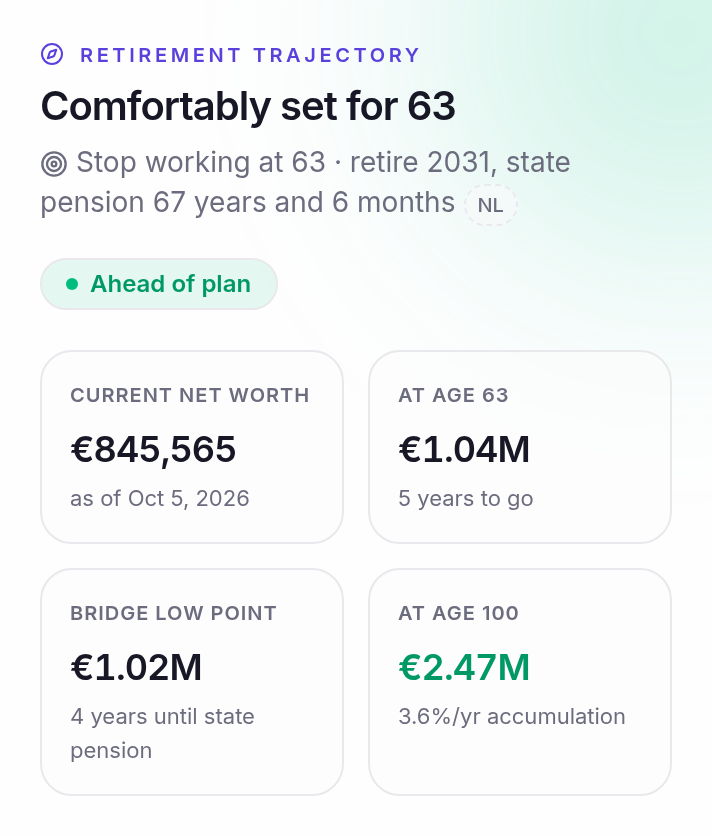
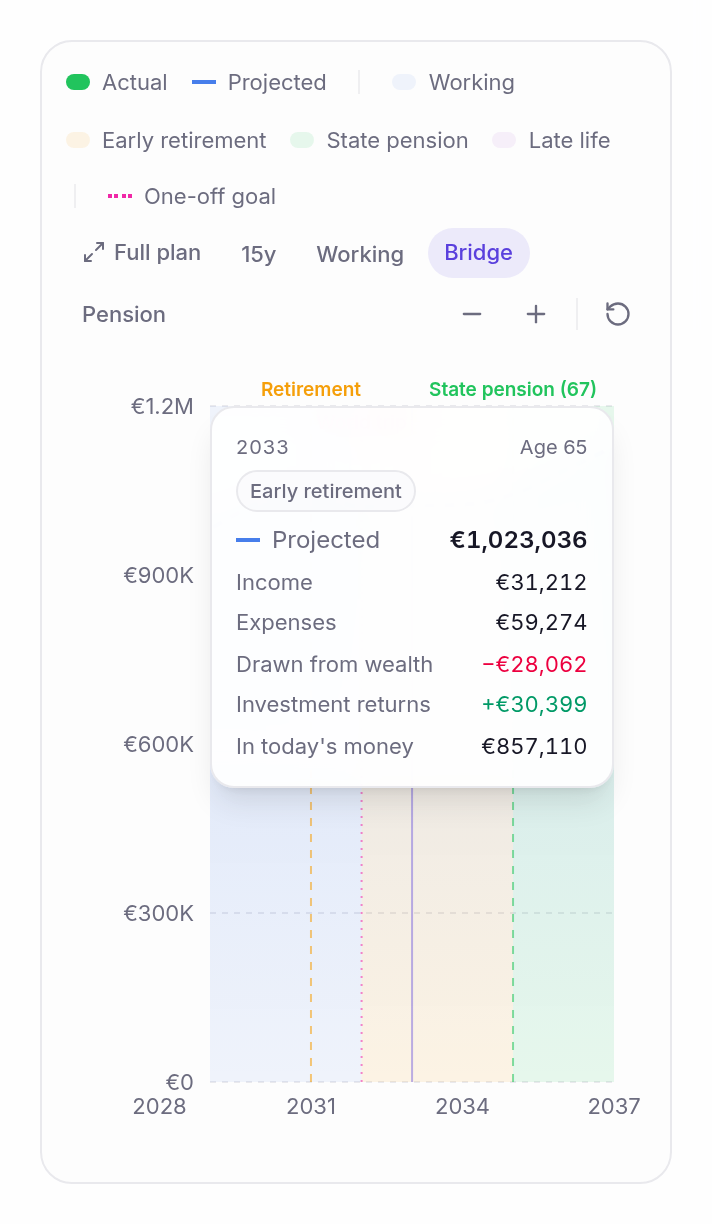
The retirement card of the YourFi dashboard: comfortably set to stop at 63, with net worth today, at 63, at the low point of the bridge years and at 100. The plan-to-100 chart zoomed on the bridge years, with one year's breakdown open: income, expenses, drawn from wealth, investment returns, and the total in today's money.

The live YourFi dashboard — figures from a demo account.

  • 100 — Every year of your plan, to age 100
  • 4 — Phases of life: working, bridge years, pension and later life
  • 1,000 — Market paths behind every what-if (Pro)
  • €0 — To start — the plan itself is free

The plan to 100

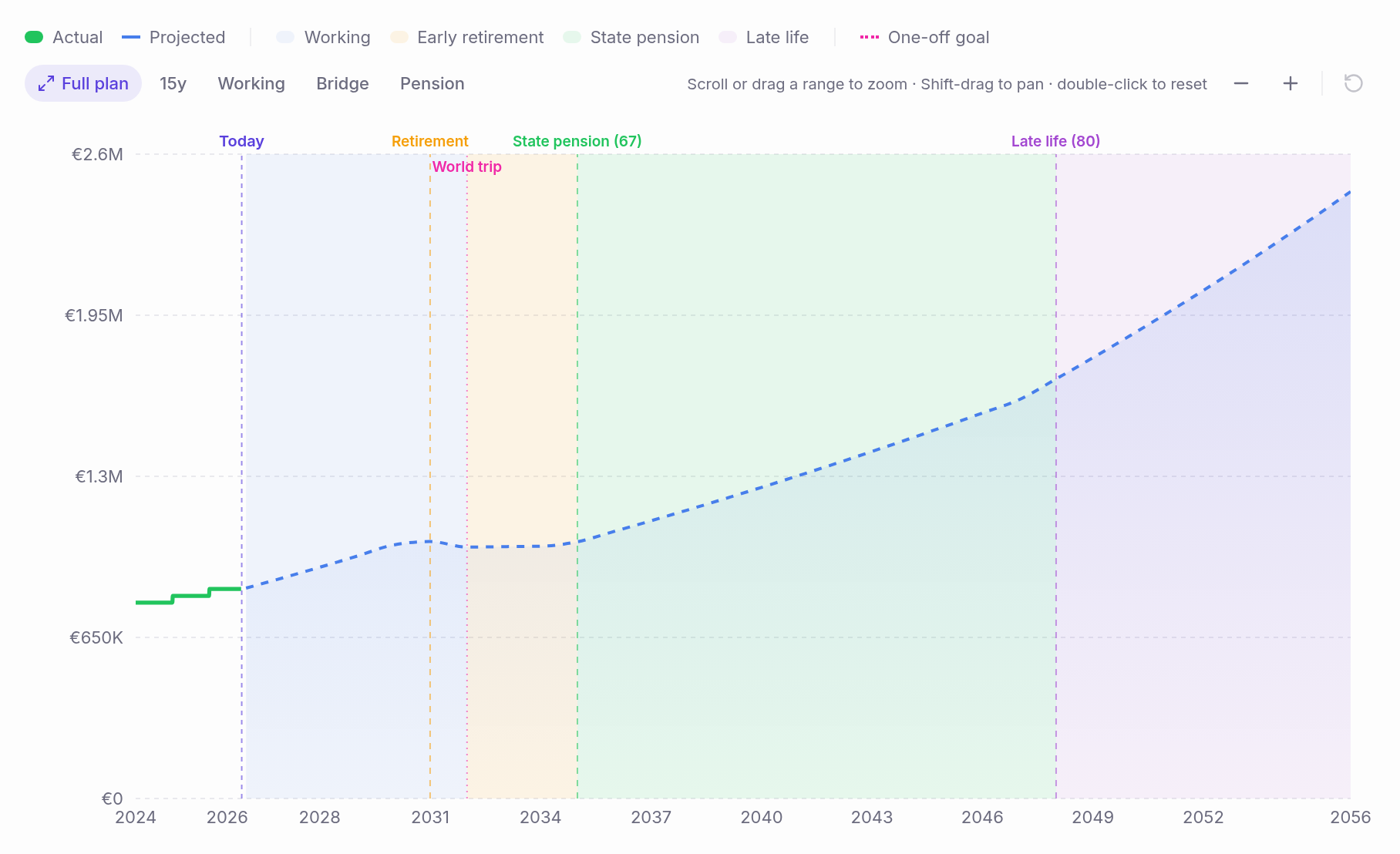
From today to later life: your plan in one picture.

One line through every phase of your life. You see when your salary stops, which years your own wealth has to bridge, when your state pension starts — and whether the money lasts.

The chart of a whole plan in the YourFi retirement planner: net worth from today to later life, with the phases working, early retirement, state pension and later life.
  • Working

    Your net salary comes in, and what you don't spend is added to your wealth — until the month you stop.

  • Bridge years

    Stop before your state pension starts and your own wealth pays for the years in between. The plan shows how low that takes it.

  • Pension

    Your state pension starts at the statutory age for your date of birth, your employer pension on the date you enter — both as income for life.

  • Later life

    From 80 the plan counts on lower spending, unless you enter an amount of your own for those years.

What the planner does

More than a retirement calculator: a plan you can steer.

A calculator answers one question, once. The planner keeps your whole picture and recalculates every year of it the moment a figure changes.

Your retirement income, source by source

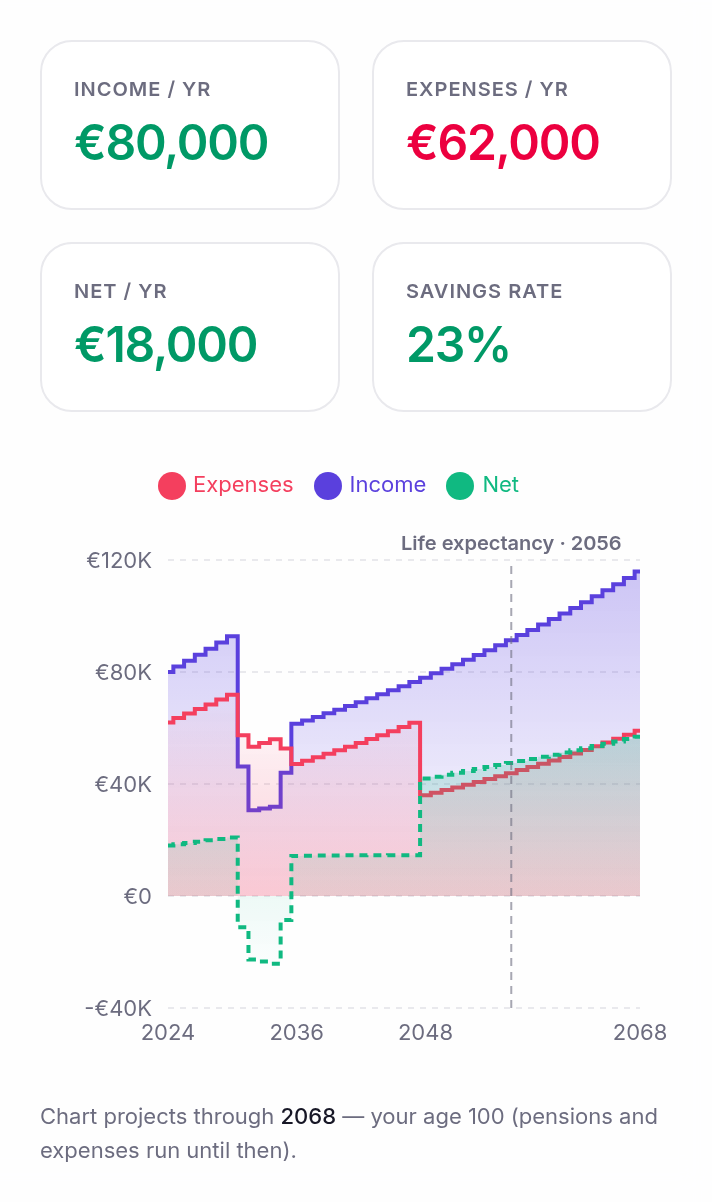
Your salary until the month you stop, your state pension from the age it starts and your employer pension for life — each with its own start date and yearly increase. Next to it: what you spend in every phase of life.

  • Income and spending per phase: working, early retirement, pension and later life
  • Add your state pension and your employer pension once and they stay in the plan as income for life
  • Every amount net per year, with its own growth rate
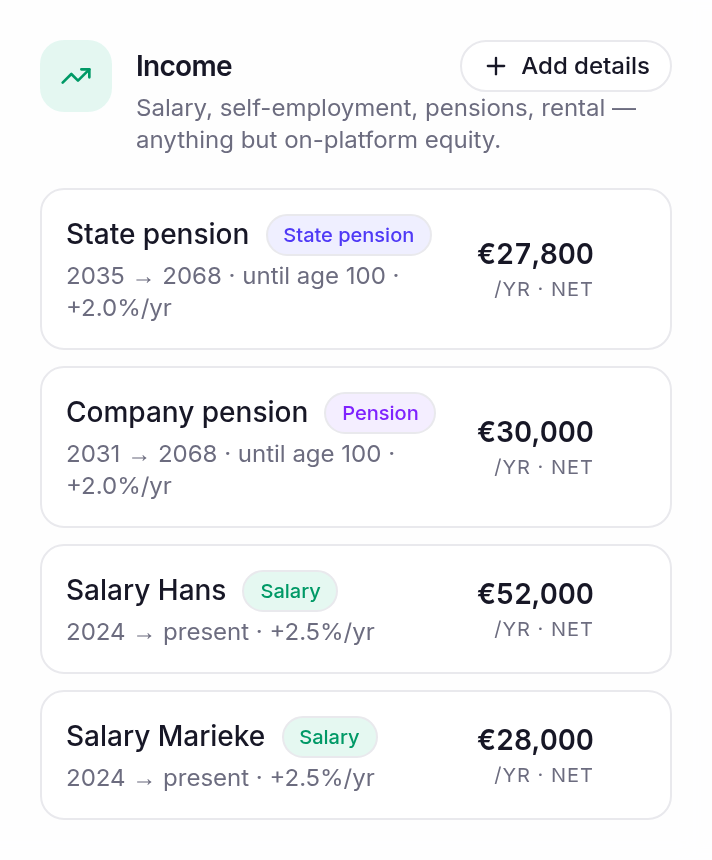
The income sources of a retirement plan in YourFi: state pension, company pension and two salaries, each with its start year, yearly increase and net amount. The Profile page in YourFi: income, expenses, net and savings rate per year, with a chart of income and expenses for every year to age 100.

See where you stand against your goal

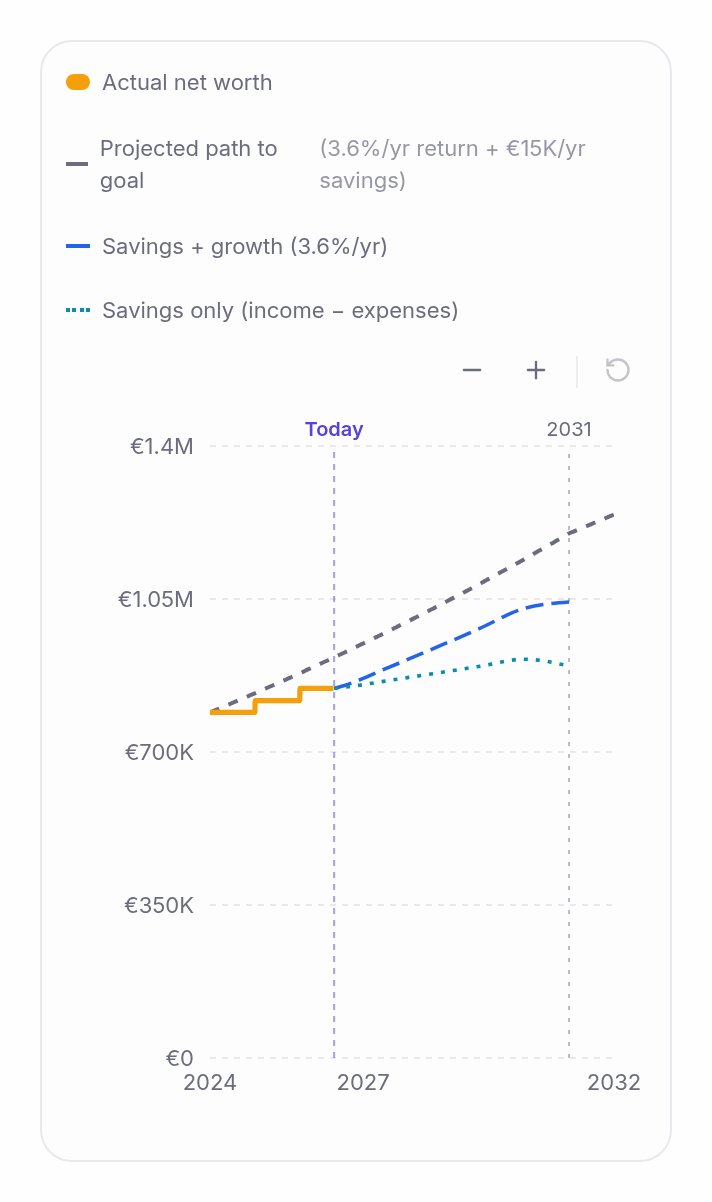
Set the month you want to stop and the wealth you want to have by then. YourFi measures your net worth against the path to that goal, in euros and in percent — and a one-off goal such as a world trip takes its place in the plan.

  • Your retirement date to the month — where the plan starts from
  • Progress towards your goal, kept up to date as your accounts change
  • One-off goals such as a trip count as spending in their year
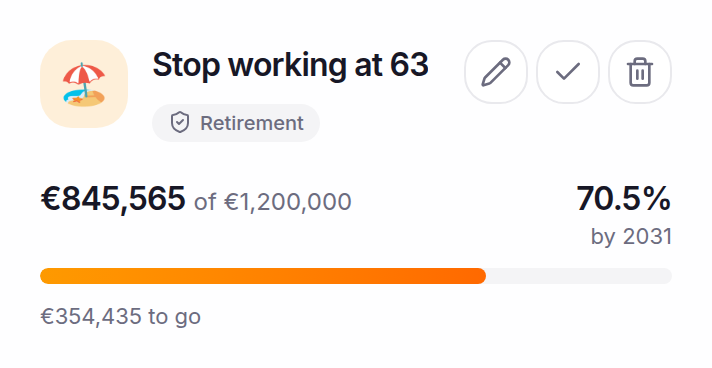
A retirement goal in YourFi: stop working at 63, with the wealth built so far against the target amount and the progress in percent. The net-worth trajectory chart of the YourFi dashboard: actual net worth up to today and the expected path to the goal in 2031, next to the lines for saving alone and for saving plus returns.

Explore other ways to retire

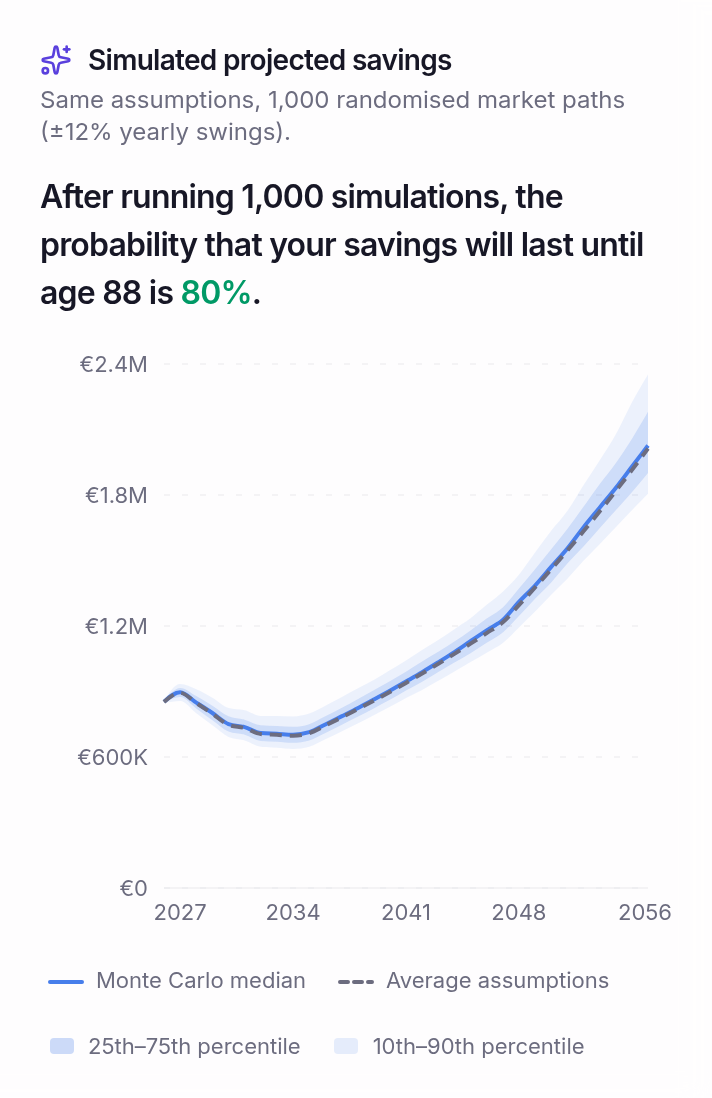
Stop three years earlier, work one day less, spend less once you are retired, live five years longer: each what-if recalculates your whole plan, sets it next to today's plan and runs it down 1,000 market paths — so you see the odds, not just the average.

  • Ten ready-made what-ifs, or describe your own in plain words
  • What you can safely spend each month, next to today's plan
  • The share of 1,000 market paths in which your money lasts
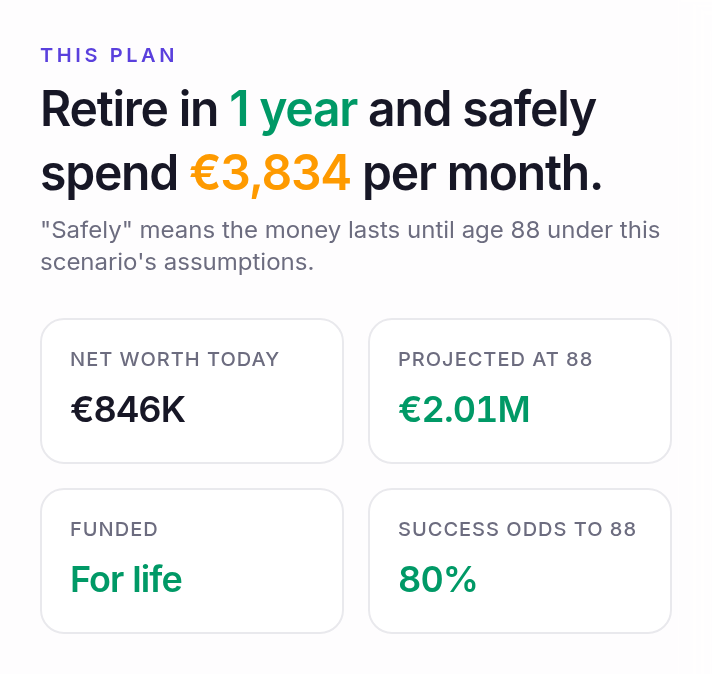
YourFi what-if “Stop working 4 years earlier than planned”: how soon you could retire, what you could safely spend each month and the odds of success. Result of a YourFi scenario: the probability that the savings last until age 88 after 1,000 simulations, with a fan chart of the outcomes.

Three steps to your retirement plan.

  1. Put in what you have

    Savings, investments, your home and the mortgage on it, your pension pots. Upload an export from your broker or type the figures in — there is no bank connection to set up.

  2. Add income, spending and your date

    What comes in, what goes out and when you want to stop. The date starts at your statutory pension date; move it to the month you have in mind.

  3. Read your plan, and adjust it

    Your plan to 100, with the age your money lasts until. Change a figure and the whole plan is recalculated.

Calculator or planner

A quick sum, or a plan that keeps up?

Start with whichever fits. The calculator needs no account; the planner is for the plan you want to keep.

The free calculator

A handful of figures, one chart. Good for a first impression of when you could stop working.

  • No account and no e-mail address
  • Your wealth year by year to 100, on your own assumptions
  • Your figures stay in your browser

Open the calculator

The retirement planner

Your real accounts, your home, mortgage and pensions, with income and spending per phase of life.

  • Your own accounts and holdings, imported or typed in
  • Your state pension from the statutory age for your date of birth
  • Wealth tax in the projection, if you switch it on
  • What-if scenarios down 1,000 market paths, with Pro

What we stand for

Built to read, never to move your money.

A subscription instead of commission, no bank connection that can break, and read-only access that can never move your money.

Free to start, no card. Pro is €12 a month, or €9 a month if you pay for the year. See what's in each plan

  • No bank logins

    There is no bank connection to authorise — nothing to revoke, and nothing to break.

  • Read-only by default

    We can never move your money.

  • Passwordless sign-in

    A one-time code by e-mail. No password to leak or forget.

  • We never sell your data

    And we never use your financial data to train third-party models.

More free calculators

Separate questions around your retirement, each worked out without an account.

Questions about the retirement planner

What is a retirement planner?

A retirement planner projects your income, your spending and your wealth year by year, so you can see whether your money lasts and from what age you could stop working. Unlike a calculator it works with your whole situation — accounts, home, mortgage and pensions — and stays up to date as that changes.

How is a retirement planner different from a retirement calculator?

A calculator answers one question from a handful of figures. The planner holds your real accounts and pensions, splits income and spending by phase of life, includes one-off goals and recalculates every year of the plan when a figure changes. For a quick first impression there is the free calculator, which needs no account.

When can I retire?

That depends on what you have, what you spend and what comes in later. Enter the date you have in mind and the plan shows whether your wealth carries the years until your state pension starts, and whether it lasts after that. If it does not, you see the year the money runs out — and what moving the date, your spending or your savings does to it.

How much money do I need to retire?

There is no single figure: it follows from what you spend, what your pensions pay and how many years lie in between. A well-known rule of thumb is 25 times the yearly spending your pensions do not cover (the 4% rule), but it ignores when your state pension starts, your home and tax. The planner works it out from your own figures, year by year.

Does the plan include my state pension and my employer pension?

Yes. Your state pension starts at the statutory age for your date of birth and your employer pension on the date you enter; both count as income for life. If you enter no state pension yourself, the plan uses an estimate for your country.

Which assumptions does the plan use?

Every income and every expense grows at the rate set on it. Your investments grow at a return that is lowered once you start drawing on them, your savings at their interest rate, and every amount is also shown in today's money. The retirement card names the rates it used.

Is the retirement planner free?

Yes. The plan to 100 — your accounts, home, mortgage and pensions, the retirement card and up to three goals — is free and needs no credit card. Pro adds, among other things, what-if scenarios down 1,000 market paths; the pricing page shows what it costs.

Do I have to connect my bank?

No. There is no bank connection: you upload an export from DEGIRO, Saxo, Trade Republic or ING, or type your figures in. YourFi is read-only and can never move your money.

Is this financial advice?

No. YourFi calculates and explains your own figures; it gives no personal advice and recommends no products. A projection is an estimate that rests on assumptions. For advice, talk to a licensed adviser.

See your retirement before you get there.

Free to start, no credit card. Or run the numbers first in the free calculator — no account, no email.

Try the free calculator

Every screenshot comes from the real product, with the figures of a demo account. The planner calculates and explains your plan — it is not financial advice.